A fuel, repair or tyre cost becomes useful to a fleet only when you know which vehicle it belongs to. The KSeF page retrieves purchase invoices for a selected period and lets you classify them as a company cost, employee cost or driver fuel. Those choices feed vehicle history and finance analysis.
1. Choose dates and fetch KSeF invoices
- Go to KSeF.
- Set From and To for the period.
- Click Fetch invoices from KSeF.
The result reports newly downloaded and skipped invoices. Skipped invoices already exist in the panel, so fetching the same period should not create duplicates. If KSeF is not configured, open its settings first.
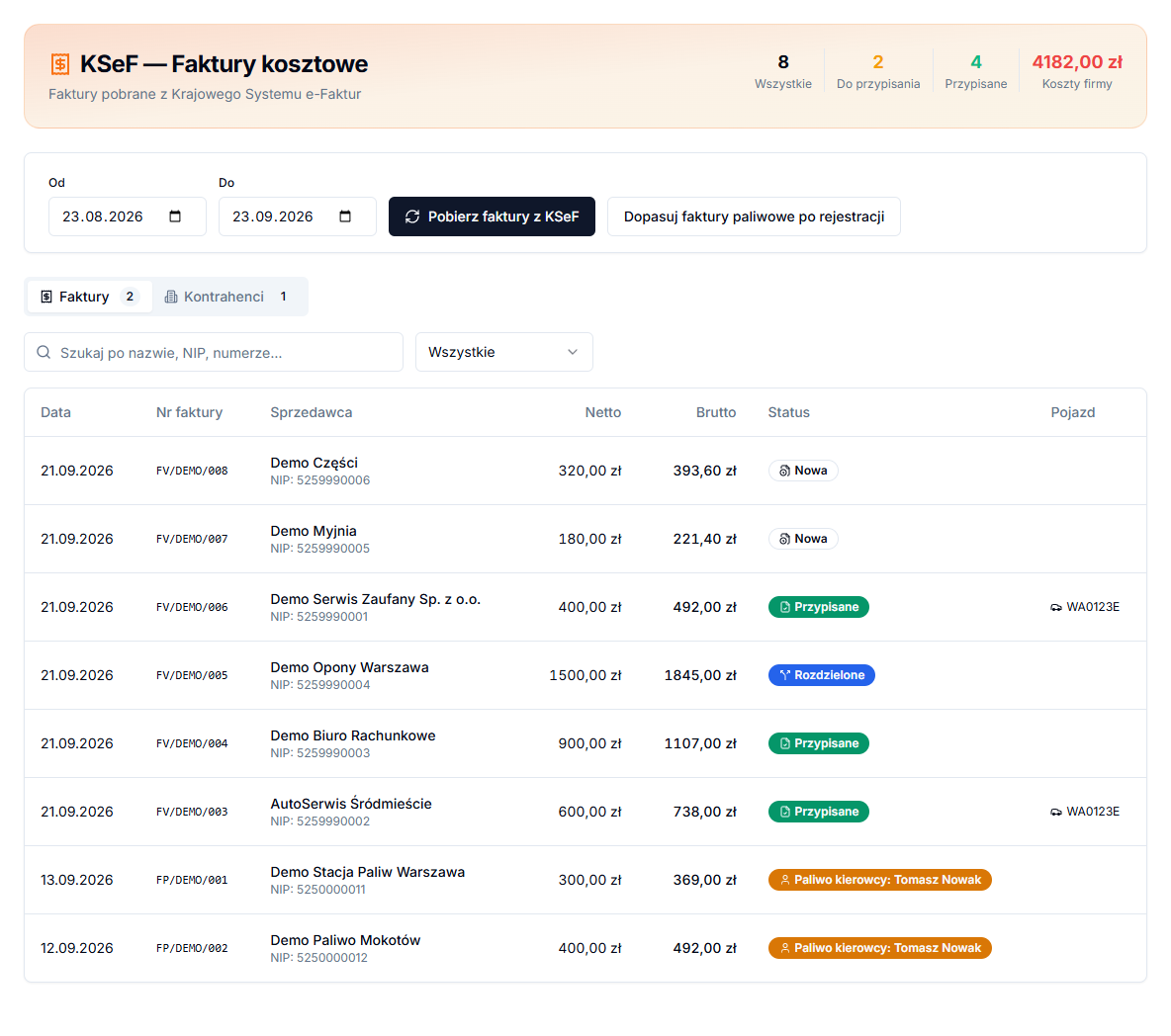
2. Read KSeF invoice statuses
The Invoices tab contains filters and date, invoice number, seller, net, gross, status and vehicle columns. New means a decision is needed. Assigned is a whole-invoice assignment. Split means items were handled separately. Employee cost keeps a document outside company costs.
3. Assign a whole invoice as a company cost
- Open an invoice row.
- In Invoice assignment, choose Company costs.
- Select Vehicle, or leave None (company cost).
- Choose Category; Mileage (km, optional) is optional.
- Click Assign as company cost.
A vehicle assignment creates a cost linked to vehicle service history. For an accounting firm or shared expense, use a company cost without a vehicle. Review invoice items before deciding whether to split the document.
Employee cost and driver fuel
Choose Employee cost and Mark as employee cost when the document should not burden company costs. For a driver fuel invoice, choose Driver fuel, select a person in Select driver, then click Assign to driver (VAT refund). The preview shows VAT and refund using the configured percentage.
Match fuel invoices by registration number can match fuel documents by plate number. Ambiguous results must be checked manually. See Driver fuel invoices and VAT refund for that workflow.
A practical order for new documents
After retrieving invoices, start with the seller and item description rather than the largest amount alone. A workshop invoice may require a vehicle and category, while an accounting invoice will usually remain a company cost. If a document is driver fuel, choose the separate driver-fuel type rather than creating a vehicle service cost. This sends the data to the appropriate part of the panel.
For every decision, compare the date, invoice number and gross amount with the source document. Search the table by name, Tax ID or invoice number. After saving, verify the status and Vehicle column. If the type or vehicle was wrong, reopen the invoice, use Undo assignment, and save the correct decision instead of creating a second manual cost.
An invoice can offer Link to task when it relates to a task or an existing task cost. Use that option only for the same expense. The description explains whether the task will close or no second cost record will be created, helping prevent a repair from being counted twice.