Invoices for fuel, servicing, tyres, car washes and accounting can reach KSeF instead of a separate document inbox. Once KSeF is connected in TwojaFlota, you can retrieve the company’s purchase invoices and assign each cost to a vehicle or the company. This guide covers the authorization token, environment and daily synchronization.
Prepare the KSeF authorization token
Get a token in KSeF for the company whose invoices you want to retrieve. Enter only the authorization token in the panel, not a description, password or a whole file. Before configuring it, confirm the KSeF environment in which the token was issued.
1. Open the integration settings
- Go to Settings → KSeF.
- In KSeF environment, open Environment.
- Select Test, Demo or Production to match the token.
Test is for test data, while Demo is a separate demonstration environment. Choose Production only for real company invoices. The alert shown there is a useful reminder that you are working with live data.
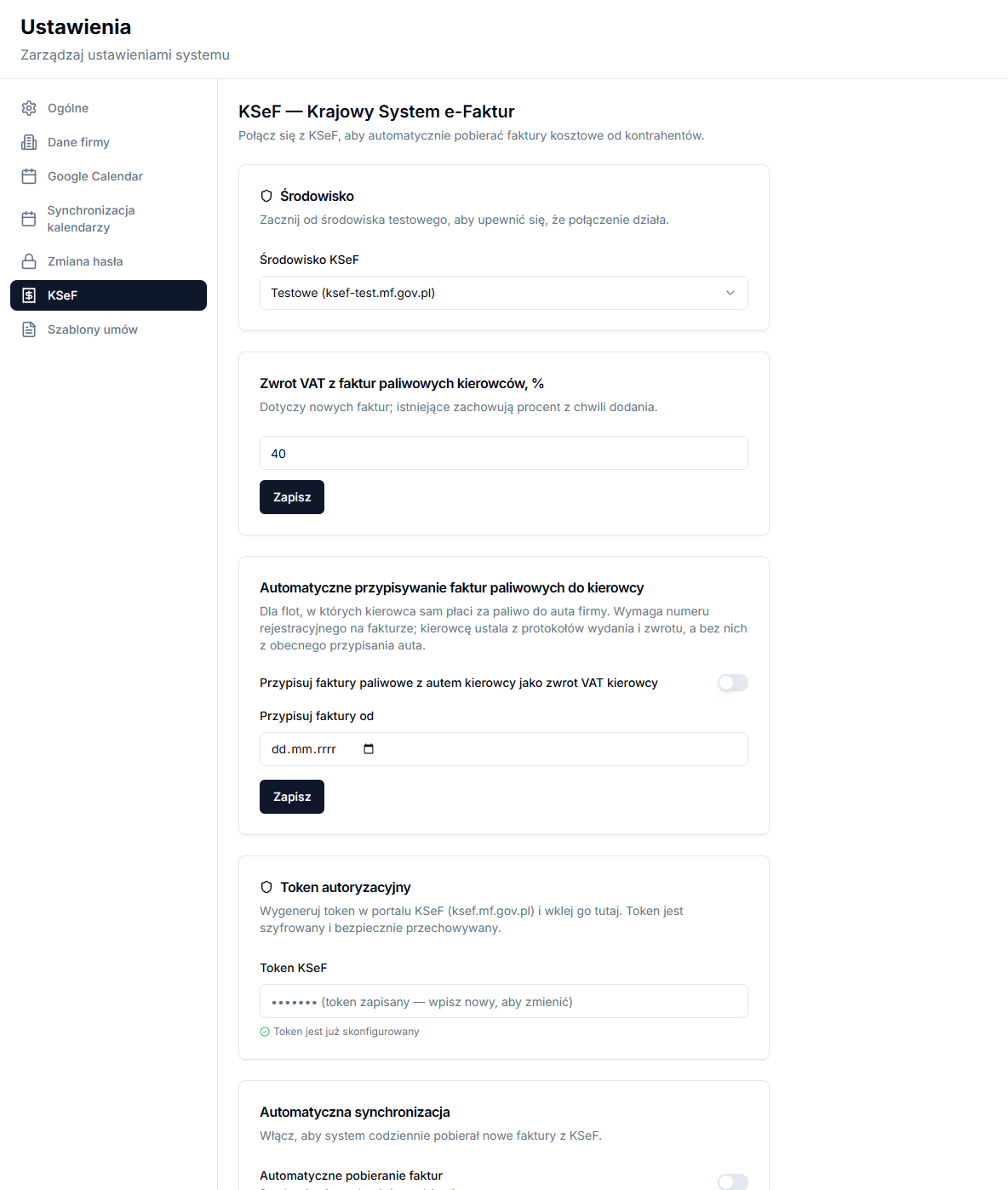
2. Add the token and save
- In Authorization token, paste the value into KSeF token.
- Enable Automatic invoice retrieval if invoices should be retrieved every day.
- Click Save settings.
After saving, the token text is not displayed. Token is already configured means that the token has been stored, not necessarily that authentication has succeeded. Save again whenever you change the environment or token.
3. Test the KSeF connection
- Click Test connection after saving.
- Wait for the result message beneath the buttons.
- If it fails, first check that token and environment match, then save the corrected settings.
The test checks authentication; it does not immediately retrieve the invoice list. Use the KSeF page and a date range for the first retrieval.
Automatic sync and last result
Automatic invoice retrieval runs once a day. It is useful for regular fleet costs, though invoices after a major service or month end still deserve review. Last synchronization appears after a sync and shows Date, Status, the number of Invoices and any error.
Check the setup before the first month
After a successful test, you do not have to turn on automatic retrieval immediately. First, retrieve a short date range that you know and check sellers, invoice numbers and amounts in the list. This confirms that you are using the intended company and KSeF environment. Then enable daily retrieval so new documents do not wait until month end.
If the person responsible for documents changes or the token is revoked in KSeF, update it in settings and run Test connection again. Do not attempt to solve a connection error by repeatedly fetching invoices. Read the test result and Last synchronization first; this distinguishes a configuration problem from a date range containing no documents.
For a taxi fleet, review synchronization after a day on which a service invoice is expected and before preparing monthly information for the accountant. An invoice appearing in KSeF does not yet affect a vehicle result until it is classified and, where appropriate, assigned to a vehicle.