At month end, an accountant needs an ordered view of revenue and costs, while a fleet owner needs to spot omissions quickly. The Accountant package brings together settlement, service, refuelling and KSeF data in one control view. Learn to choose a month, download the material and identify items to clarify before handing it over.
1. Open the package and choose a month
- Go to Finance.
- Click Accountant package.
- Choose the required month in Month.
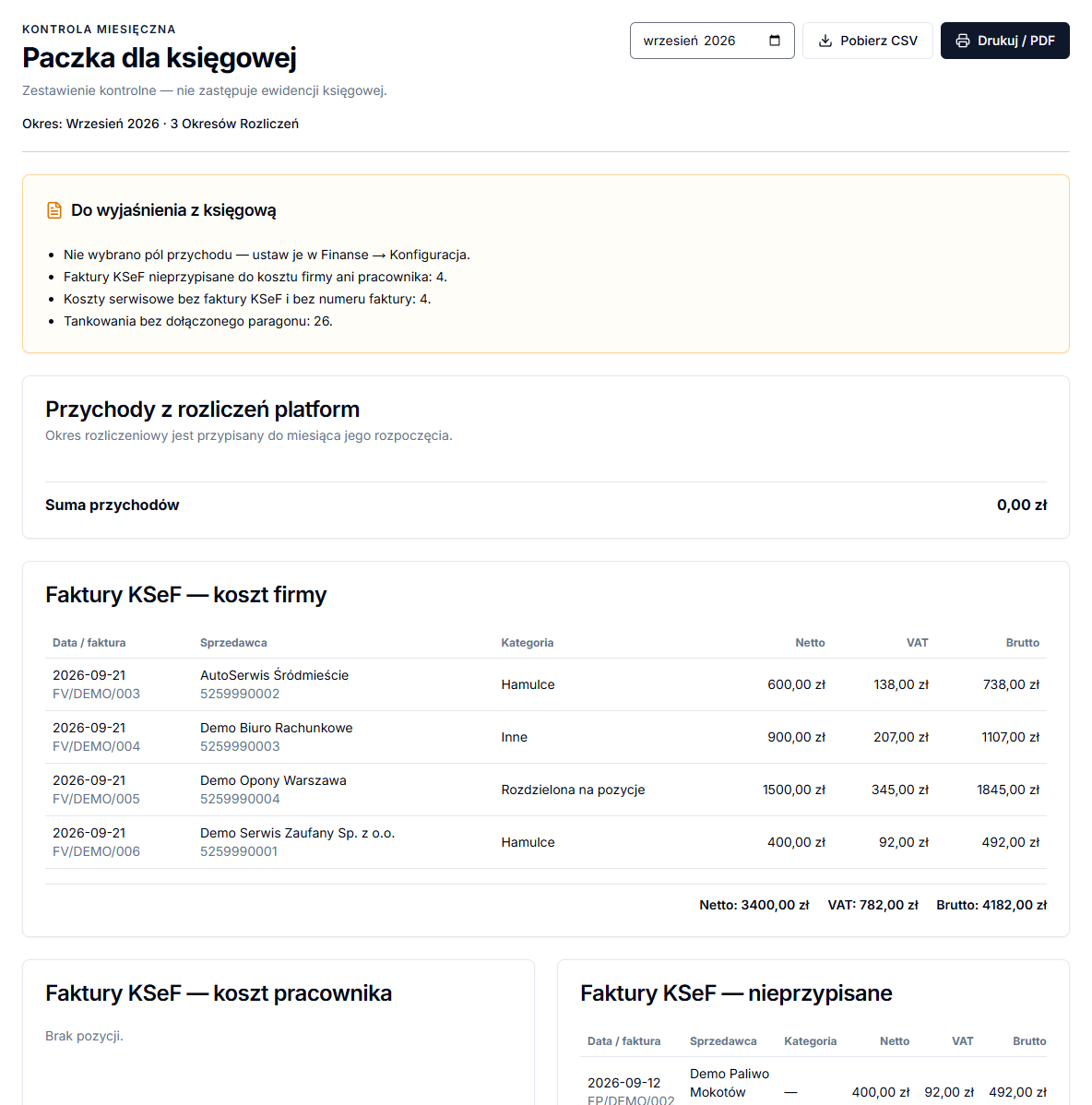
The page displays the period and number of settlement periods included. Platform settlement revenue belongs to the month in which the settlement period starts. This matters for a week beginning at the end of one month and ending in the next.
2. Review revenue and costs without KSeF
Platform settlement revenue lists chosen revenue fields and Total revenue. If it is empty or incomplete, return to Finance → Configuration and check the selected fields. Below, Costs without a KSeF invoice includes Service and Refuelling, followed by Total costs without KSeF.
KSeF invoices in the package
Three sections keep decisions made on the KSeF page separate: KSeF invoices — company cost, KSeF invoices — employee cost and KSeF invoices — unassigned. Each item shows date or invoice, seller, net and gross. Do not ignore unassigned documents: decide their type in KSeF or ask the accountant to clarify them.
3. Review items to clarify
- Open To clarify with the accountant.
- Review missing revenue fields, unassigned KSeF invoices, service costs lacking invoice data and refuelling entries without a receipt.
- Notice settlement periods that start in one month and end in another.
These are not automatic corrections. The list identifies data that needs a decision, document or discussion. For example, a KSeF invoice may be correct but unassigned because it is an employee cost; mark it in KSeF after deciding.
4. Download or print the summary
- Click Download CSV when the accountant needs tabular data.
- Click Print / PDF to print or save through the browser print dialog.
- Provide source documents as agreed with the accounting firm.
CSV and print are two ways of sharing the same monthly control view. An export does not resolve a missing receipt or unassigned cost, so address the notices first.
A fleet month-end routine
Start with KSeF invoices — unassigned, because it quickly identifies documents with no recorded decision. Open them on the KSeF page and classify them as a company or employee cost when you have confirmation. Then review the service and refuelling items lacking documents in the clarification section. This order reduces the risk that the same expense is discussed twice or missed.
Compare Total revenue with your own platform-settlement summary. If a difference comes from a week crossing two months, remember the period-start rule. If it comes from revenue configuration, do not edit an amount in the package: correct the selected fields in Finance, then return to the month.
Before sending CSV or a printout, note the items that need an accountant's answer, such as document classification or a missing receipt. The export supports discussion and checking; it does not replace the source document. Agree with the accounting firm which originals still need to be supplied and in which form.