Reporting vehicle faults in a taxi fleet lets a manager distinguish work that needs an immediate stop from work that can be scheduled. A driver records the issue for their car and the fleet sees it in one register. This guide explains the records and checks that help you act on the real condition of the vehicle.
Complete the workflow
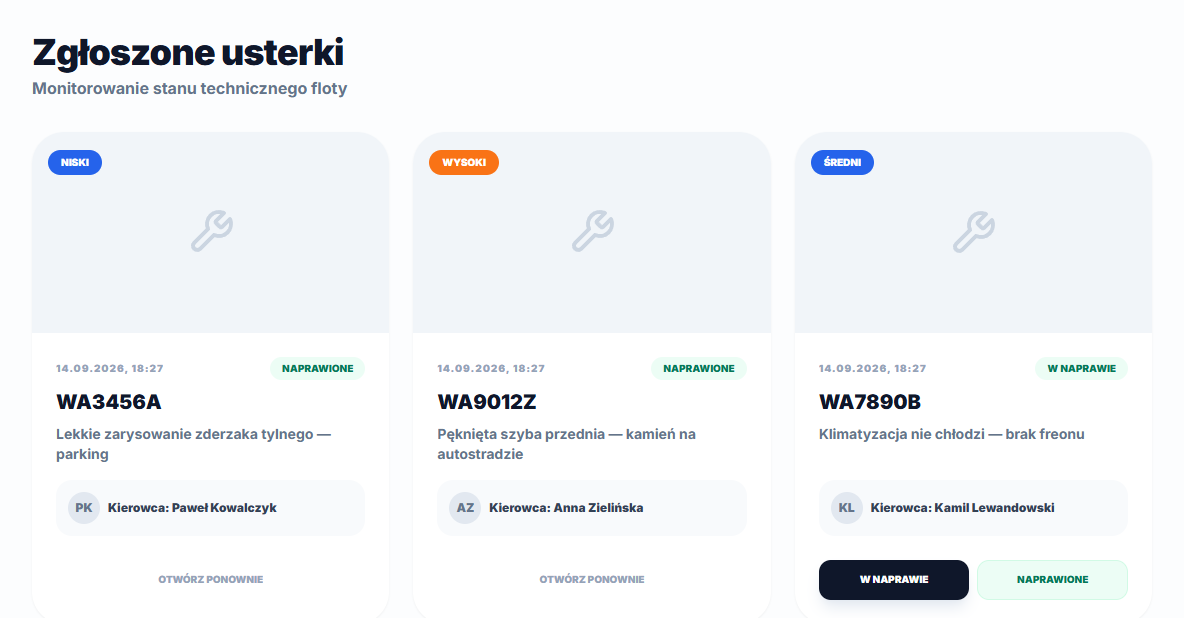
A driver starts in My car, provides a description and Priority, and can add one photo after the report is created. The manager opens Vehicles → Faults, checks the registration, Driver, description and priority, then selects Under repair, Resolved or Reopen as the work progresses.
Use the information in context
Priority is reported information, not an automatic diagnosis. A brake warning may justify removing the car from use immediately, while cosmetic damage may wait for a workshop booking.
Notifications and priority on the fault list
When an address is set in General settings under Notification email, that address receives a message about the new fault report with the vehicle registration number, driver details, description and priority. The field is optional — without it, the report still appears on the Vehicles → Faults list for the manager. A Critical priority does not remove the vehicle from service automatically or trigger a separate alert; a manager decides whether to stop using the car after reading the description and checking its condition.
The priority badge on the list highlights only two levels: Critical gets a red background and High an orange one. Medium and Low share the same blue badge, so when scanning cards quickly you need to read the label itself rather than rely on color alone.
A fault report stores the driver who was assigned to the car at the moment the report was created. Reassigning the vehicle to a different driver afterwards does not update that field on existing reports — if the car has changed hands and a fault is still open, check the report's date and the assignment recorded at that time, not just the driver currently shown on the vehicle profile.
The fault description must be at least 5 characters long and at most 1,000 — expand a bare "not working" by at least one sentence so whoever reviews the report knows exactly what the problem is before deciding on repair priority.