TwojaFlota is a fleet management panel: drivers, vehicles, tasks and weekly settlements for Bolt, Uber and FreeNow in one place. This guide shows you how to get started.
Some screens of the panel are still in Polish. In these guides, button names are shown in Polish exactly as they appear on screen, with the English meaning in brackets.
Signing in
- Go to your company address, for example yourcompany.twojaflota.com.pl. You receive it when you register.
- Enter your username or e-mail and password, then click Zaloguj się (Sign in).
- On your first sign-in, you'll be asked to set your own password.
Forgot your password? Click Zapomniałeś hasła? (Forgot your password?) below the sign-in form.
Panel layout
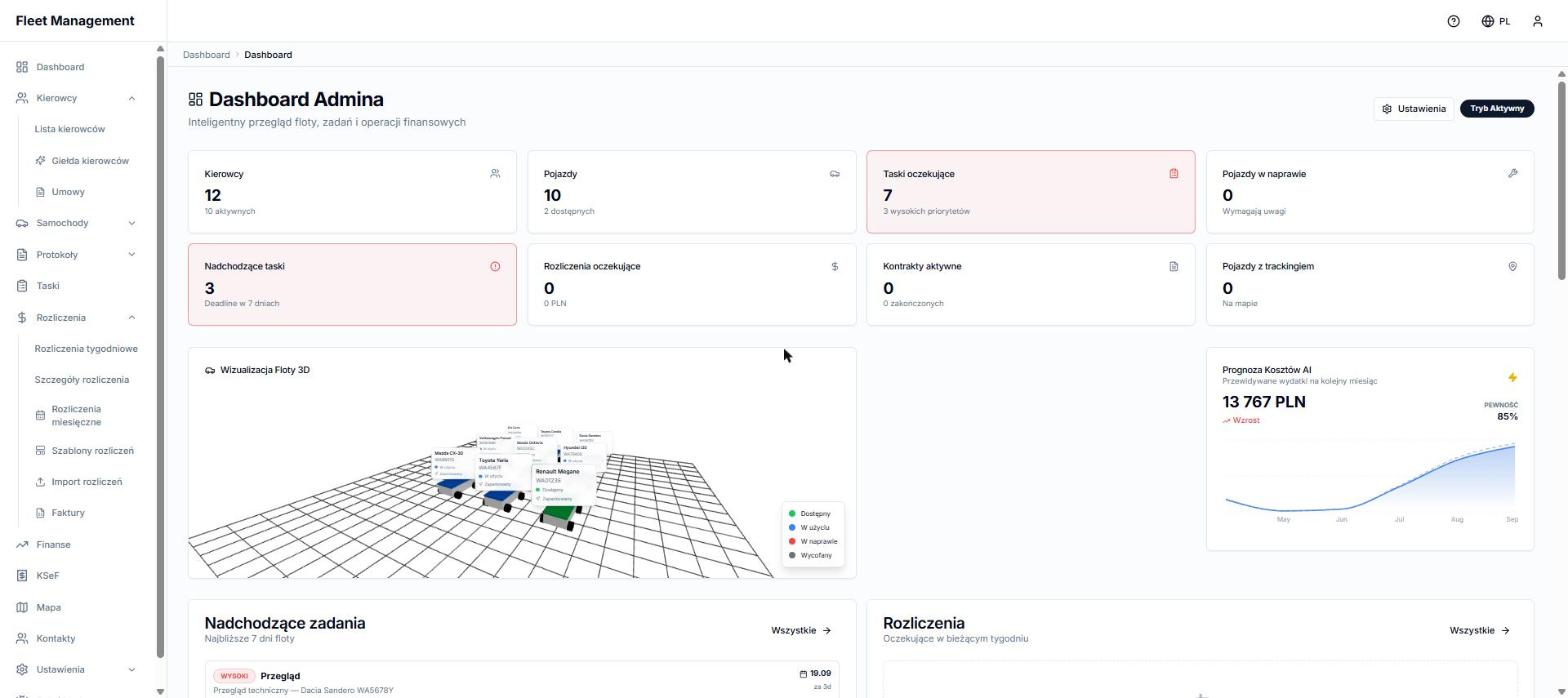
The menu on the left takes you to every module:
- Kierowcy (Drivers): driver list, driver marketplace and contracts.
- Samochody (Vehicles): vehicles, faults and workshop price comparison.
- Protokoły (Protocols): vehicle handover and return reports.
- Taski (Tasks): tasks and deadlines (inspections, insurance).
- Rozliczenia (Settlements): weekly settlements, settlement templates, import and invoices.
- Finanse (Finance), KSeF, Mapa (Map), Kontakty (Contacts) and Ustawienia (Settings).
There are three icons in the top right corner:
- ? opens this help center,
- the globe changes the panel language (only for you),
- the person icon opens your account menu with sign-out.
Where to start
- Fill in your company details in Ustawienia → Dane firmy (Settings → Company details). They appear on settlement PDFs.
- Add your drivers (see Adding a driver).
- Prepare a settlement template (see Settlement templates) and assign it to your drivers.
- Settle your drivers every week (see Weekly settlement).