Each driver is settled with one template. You can assign a template to many drivers at once from the templates list, or to a single driver in the driver form.
Some screens of the panel are still in Polish. In these guides, button names are shown in Polish exactly as they appear on screen, with the English meaning in brackets.
Many drivers at once
- Go to Rozliczenia → Szablony rozliczeń (Settlements → Settlement templates).
- Next to the template, click Przypisz (Assign).
- Tick the drivers. Under each name you can see which template the driver currently uses.
- Click Przypisz (Assign) at the bottom of the window.
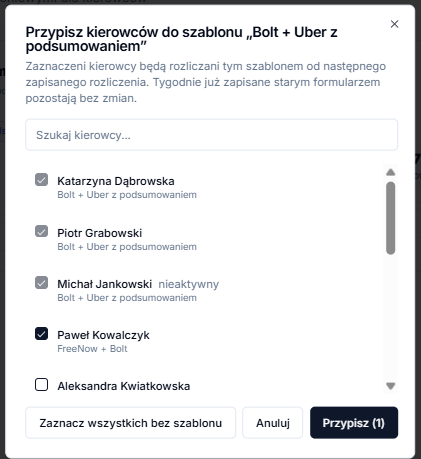
- The search box at the top filters drivers by name.
- Zaznacz wszystkich bez szablonu (Select all without a template) ticks drivers who are still on the older standard form.
- Drivers who already use this template are ticked and greyed out. To change their template, assign them a different one.
A single driver
Open the driver, click Edytuj profil (Edit profile) and choose the template in Szablon rozliczenia (Settlement template). See Adding a driver for details.
When the new template applies
A new template applies from the next saved settlement. If a driver already has a saved settlement for a week using the previous form, that week stays on the previous form.