If you keep a running balance with a driver (arrears, advances, partial payments), add a summary section to your template. Below is an example you can recreate.
Some screens of the panel are still in Polish. In these guides, button names are shown in Polish exactly as they appear on screen, with the English meaning in brackets.
Example Summary section
| Field | Type | How it works |
|---|---|---|
| Balance from previous settlements | INPUT | Unpaid balance from previous weeks. Positive: the company owes the driver. Negative: the driver owes the company. |
| Revenue from app | FORMULA | {bolt_final_payout} + {uber_final_payout}, the sum of the Bolt and Uber results. |
| Invoice | INPUT | Amount from the driver's invoice, if applicable. |
| App billing cost | FORMULA | A fixed amount, for example 40 PLN per week. |
| Social security / taxes | INPUT | Deduction for this week. 0 if there is none. |
| Total payable | FORMULA, + do Wypłaty (add to payout) | Balance + revenue + invoice − app fee − social security. |
| Amount paid | INPUT | How much you have actually paid for this settlement (in total). |
| Balance after settlement | FORMULA | Total payable − amount paid. |
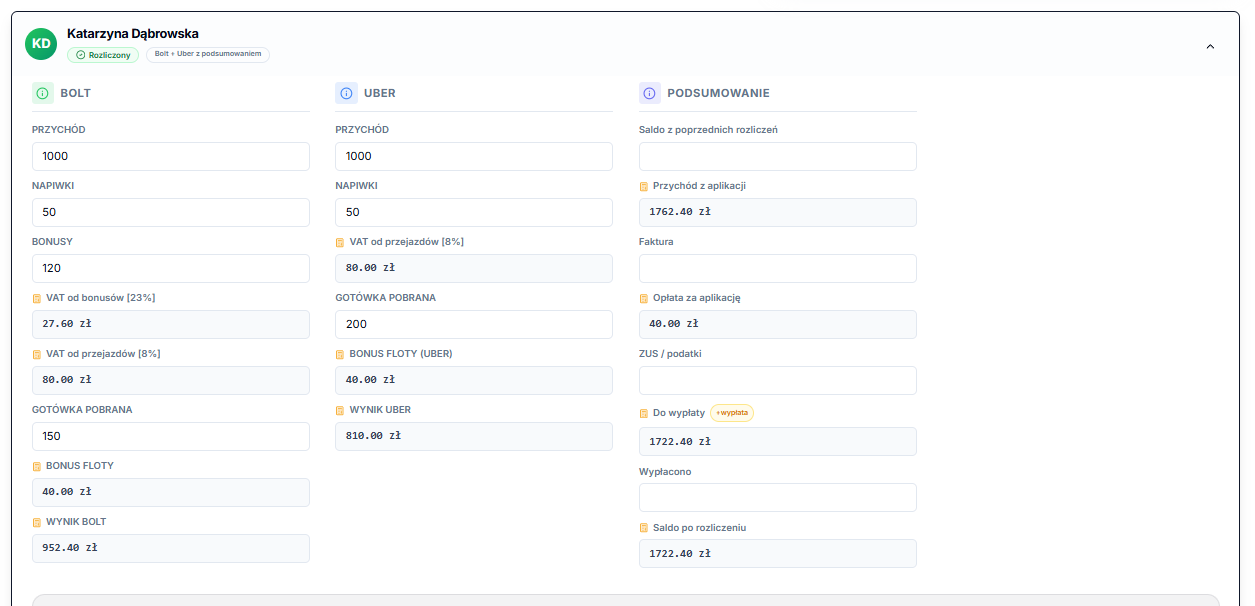
In this layout, only Total payable is set to + do Wypłaty (add to payout). The Bolt and Uber results are set to Brak (None), because they are already included in the total. See Settlement templates for details.
Partial payment
- Open the settlement for the same driver and week.
- In Amount paid, enter the total paid so far. For example, after payments of 500 PLN and 300 PLN, enter 800 PLN.
- Check Balance after settlement and save the settlement, choosing Zastąp dane (Replace data).
You enter Amount paid manually. It is not connected to your bank account.
Carrying the balance to the next week
At the start of the next week, copy Balance after settlement from the previous week into Balance from previous settlements. Do this after checking all payments.
The Zapamiętaj z poprzedniego tygodnia (Remember from previous week) option in the editor suggests the value of the same field from the previous week. It isn't suitable for carrying over the closing balance, so copy the balance manually.