For every saved settlement you can download a PDF for the driver. The document shows every item from the template and the amount payable.
Some screens of the panel are still in Polish. In these guides, button names are shown in Polish exactly as they appear on screen, with the English meaning in brackets.
PDF for one driver
- Go to Rozliczenia → Rozliczenia tygodniowe (Settlements → Weekly settlements) and choose the week.
- In the Lista wypłat (Payout list) table, click the document icon in the PDF column next to the driver.
All drivers at once
- On the Rozliczenia tygodniowe (Weekly settlements) screen, click PDF (Wszystkie) (PDF (All)), or
- on the Rozliczenia szczegółowe (Settlement details) screen, click Pobierz wszystkie PDF (ZIP) (Download all PDFs (ZIP)).
You'll get a ZIP archive with a separate PDF for each settled driver.
What the PDF contains
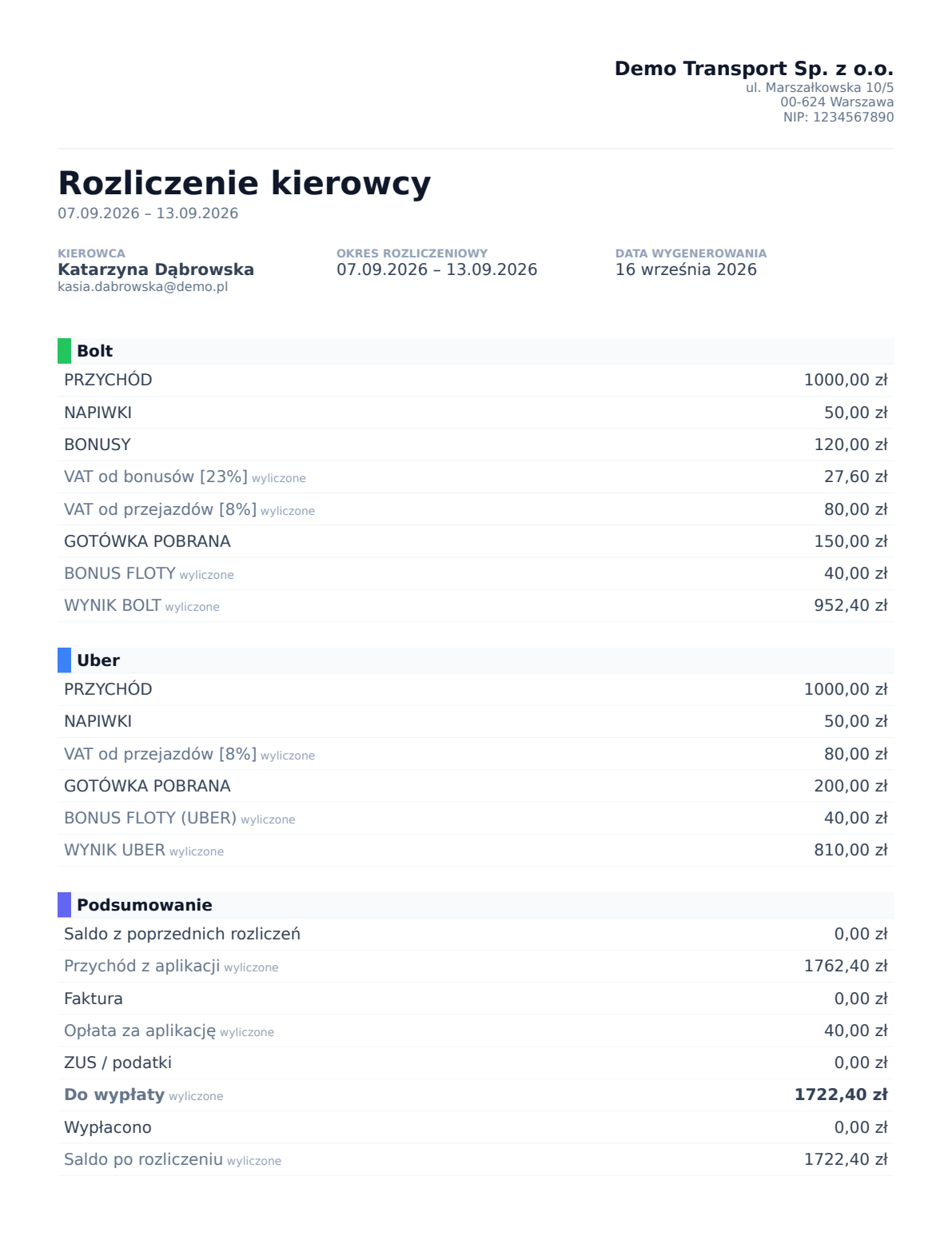
- your company details (from Ustawienia → Dane firmy (Settings → Company details)) and your logo, if you've added one,
- the driver, settlement period and generation date,
- every section and field of the template. Items calculated by the system are marked calculated,
- a highlighted Amount payable at the end.
The amount payable in the PDF always matches the saved settlement and the bank transfer batch.
Document language
The PDF is generated in the driver's language (the Document language field in their profile) or in the company default language. The language of your panel doesn't matter. See Panel and document language.
Older settlements
Settlements saved before 16 September 2026 don't include a full calculation record. Their PDF recalculates the items using the current template and includes a note about it. If you have changed the template since then, open the settlement and click Zapisz rozliczenie (Save settlement) → Zastąp dane (Replace data). From then on, the PDF shows exactly what you see on the card.
Every new settlement stores its full calculation, so later template changes don't affect its PDF.